To Learn Premiere Pro, Learn the Fundamentals and just start editing. learning from short tutorials when you need them is far more efficient at building editing knowledge, Rather than all in one go.
First things first, If you prefer to watch a video than read a blog, You are welcome to watch the video below, If not please read on!
Learning To Edit In 2024
“So Logan why is learning to edit in 2024 any different from 2024?”
Look, I’m not going to sit here and pretend like You Don’t know the interent, You and I know alot has changed from the internet and continoues to do so every year. Perhaps the biggest change is the obsession with Short Form content.
Truth is our attention spans aren’t what they used to be, we have seen a 25% drop in attention span from 2000 to 2015. That’s before TikTok and Reels started Crowding up our smartphones, God only knows what it is now.
So why am I ranting about modern smartphones and starting to sound like a grumpy old man? Well It’s because In 2024 methods to learning (especially Premiere Pro) need to be updated, Hence why this post is even on your screen.
What’s Wrong With the old System?
Time, it’s as simple as that no-one wants to sit and watch a three hour long onslaught of premiere pro knowledge, is it useful information? Of course, simply put in the wrong format. Even if someone were to fight through and watch the whole thing, how much of that can really be kept for use at a later date?
The Answer None, 3 hours of content isn’t going to magically ingrain itself in your psyche. You’ll have to rewatch again and again, and at that point it’s simply too Inefficient.
So What’s The New Way?
learn the bare minimum, Learn the smallest amount you possibly need to start. I’m talking “boot up, cut, layer, Export.” Skip the 5 hour long seminar and keep it basic.
Keeping it basic is easy, you don’t need some insider knowledge, or some great teacher to learn the basics. Hell, Whether it’s from me, Another youtuber or Jeff down the street it’s not exactly Rocket science.
Becasuse i’m such a nice guy, I’ll even run you through some:
Basic’s Of Premiere Pro
Starting A Project

Open up Premiere Pro, Select New Project. Name your project (Top Left) then press Create (Bottom Right)
Importing clips
Importing is easy, simply open file explorer and drag files into your “Project” panel (Bottom Left)

Drag Files Into your timeline to add them to your video!
Panels
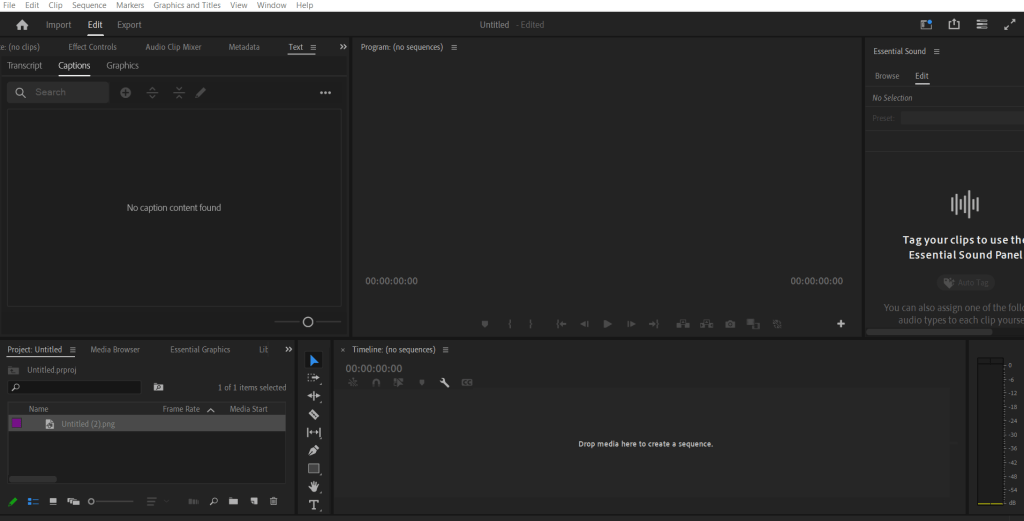
Panels are really simple, File preview (Top Left), Project File (Bottom left), Timeline (Bottom Right) and Timeline preview (Top Right).
Your Timeline is where your final video is, Top layers are Video, bottom layers are Audio.
Cut
The Razor tool, allows you to trim/ cut desired clips, make sure to go back to the Arrow tool after finishing!

Effects
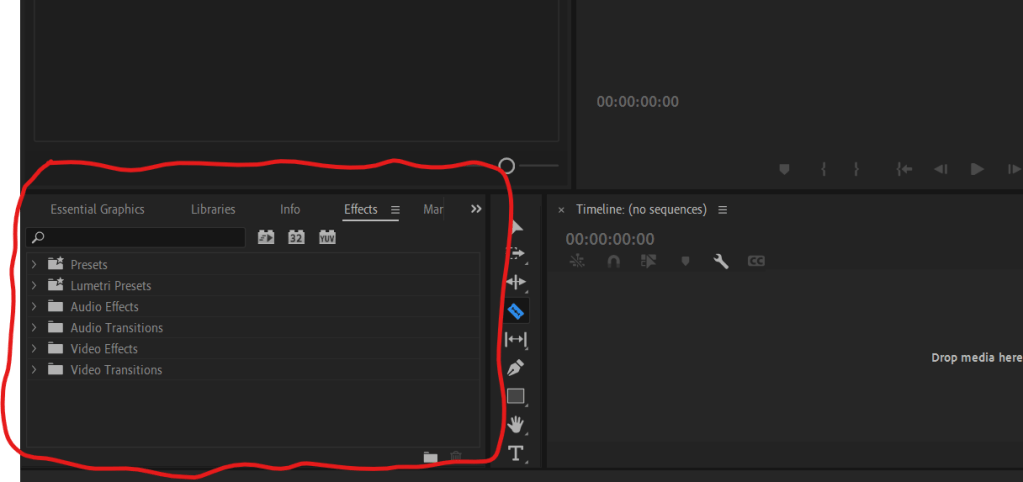
Effects are found in the project panel, find your effect and drop it onto the Video!
(If you Can’t find it, go to Window (top bar) and make sure Effects and Effect Controls are ticked.)
To Control Effects, select the clip your effects are on, and head into Effect Controls, Located in the clip Preview Panel.
Exporting
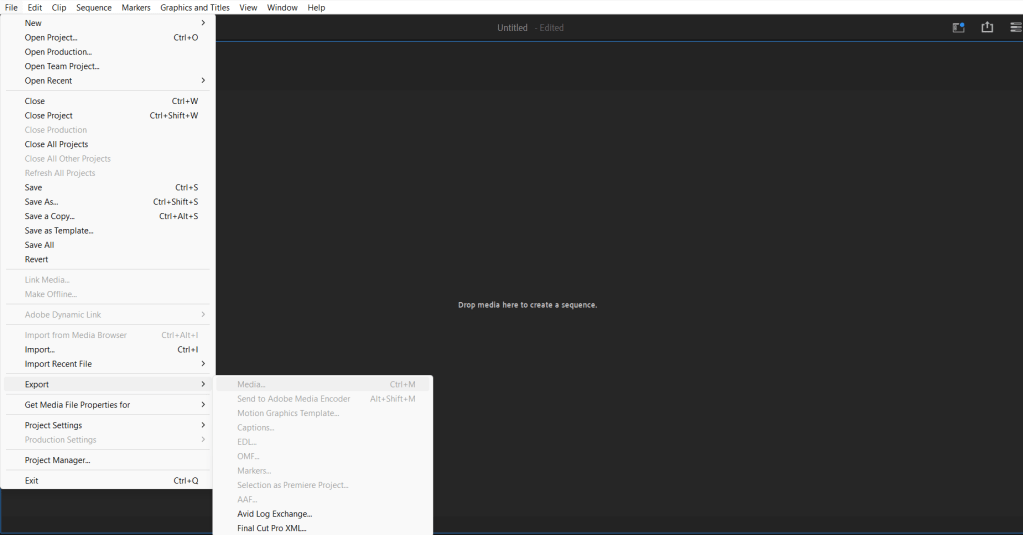
Exporting is easy, once your video is complete, select your Timeline, press File > export > Export Media.
Don’t worry about file type, just name your project and export!
How to Start (Properly)
Look you’re already ahead of a lot of people, Your ready to start! That’s right I want you to make a video right now!
Before I have you thinking you’re some big shot editor, Be prepared, your very first video is going to be bad.
No In fact I’m pretty sure it’s going to be terrible.
but you know what? That’s okay, It was always going to suck. My First edit sucked, yours will too.
I’m not telling you this to put you off, In fact I’m telling you this so you won’t be put off when your edit inevitably sucks. That’s okay You’re first edit was always going to be your first edit, No 3 hour premiere pro course was ever going to change that. If your scared of humiliation then just start out small, make stupid videos making fun of friends, even make brain rot content I Don’t Care as long as you’re starting.
As long as you’re starting something will happen, you’ll look back on your edit and think “hmmm, maybe that video could’ve used zoom in at that point.” So you’ll head into google and search “how to add zoom in Premiere Pro”? then you’ll spend 30 seconds reading a guide and implement what you learned. You will do this on that video and the next and the next…
Then suddenly you’ll realise you have this wealth of knowledge you didn’t even know you had.
And that my Friends is how you learn Premiere Pro in 2024, It’s about avoiding learning before the job and to start learning during the Job.
Thankyou for taking the time to read my Blog I sincerely hope it was helpful and that you have a wonderful rest of you’re day.

 Video Wizard
Leave a comment